
Welcome to the Federal Bureau of Control! Containing paranatural threats is best done with a squad of Firebreakers. That’s why FBC: Firebreak has a new feature called Friend’s Pass.
If you own the full game, the Friend's Pass allows you to invite up to two friends to join your party and play the game with you completely for free!
How to Install the Friend’s Pass
To play for free, your friends will need to download the Friend's Pass version of the game on their preferred platform. Here is how to find it:
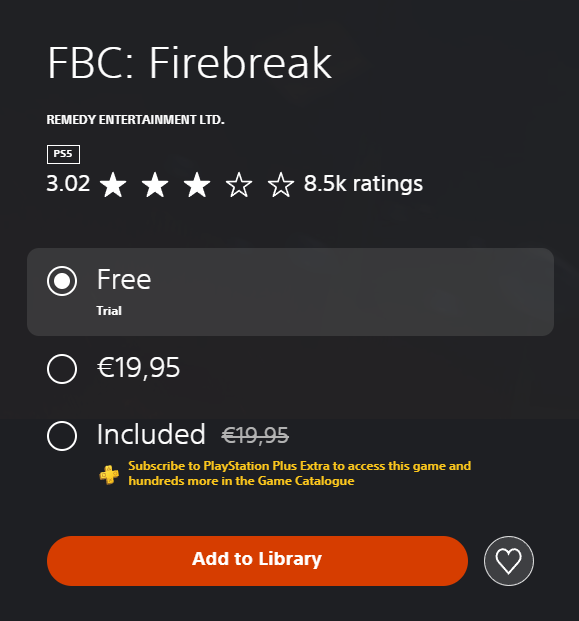
PlayStation 5
- Open the PlayStation Store on your PS5 console and search for FBC: Firebreak.
- On the game's main store page, look for the Trial version. (Note: You may need to select the "..." (More Options) icon next to the price tag to select the Trial version.
- Select Add to Library.
- Download the Friend's Pass / Trial version of the game.
- Once installed, you are ready to play!
Xbox Series X|S & Windows PC
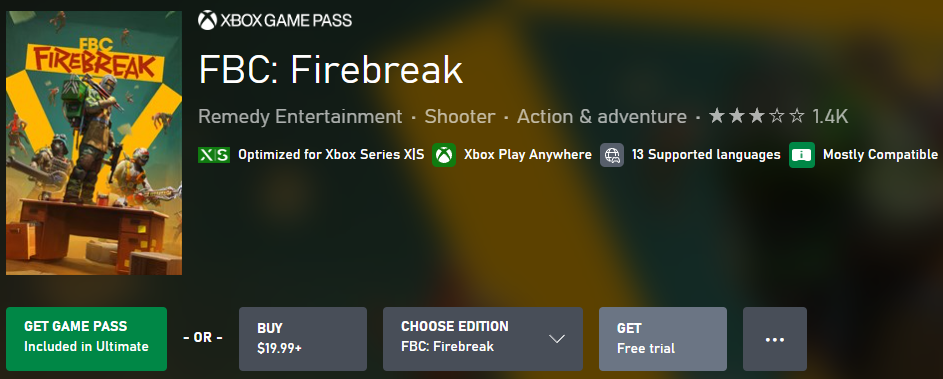
- Open the Xbox Store on your console or the Xbox App on your Windows PC and search for FBC: Firebreak.
- On the game page, look just below the title and main purchase button. Select the Get Trial (or Free Trial) button.
- Download and install the Friend's Pass version of the game.
- Once installed, you are ready to play!
Steam
- Open Steam and go to the FBC: Firebreak store page.
- Scroll down slightly past the main video/screenshot gallery.
- Look for a separate banner that says Play FBC: Firebreak Friend's Pass (located just above the standard purchase options).
- Click the green Play Game or Install button on that banner.
- Download the game and you are ready to play!

Epic Games Store
- Open the Epic Games Store launcher or website and search for FBC: Firebreak - Friend's Pass.
- On the store page, select the Get (or Download) button to add it to your library.
- Download and install the Friend's Pass version of the game.
- Once installed, you are ready to play!
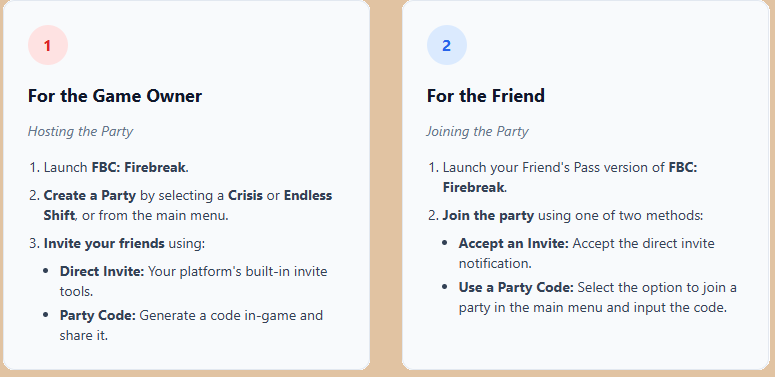
How to Invite and Play Together
Once the game owner has the full game and the friends have downloaded the Friend's Pass, it's time to squad up.
Contact Player Support
If you have questions or continue to encounter problems, and the issue persists, you can contact our support team for technical assistance.
- Open the Remedy Help Center. Go to remedy.helpshift.com and click the chat bubble in the lower‑right corner to start a ticket.
- Describe your issue. Select Bug Reports, Game Froze/Crash, or the most relevant option, and answer the bot’s questions. Be sure to include your email address, platform (Steam, PlayStation, Xbox, Switch, etc.), User ID, screenshot/video, and a clear description of what went wrong.
- Provide additional details. Player Support may ask you for additional files or info that may help with your issue, such as Error Code/Message, DxDiag, or MSInfo.
For comprehensive bug‑reporting instructions, refer to FBC: Firebreak - How to Report Bugs & Crashes in our Remedy Technical Support and Help Center.